10 Best Touchscreen Monitors for Graphic Designers (2026)
The best touchscreen monitors for designers in 2026, from 4K desktop displays to ultra-portable options. Organized by use case with specs, pros, and expert recommendations.

Disclosure: This article may contain affiliate links. We earn a small commission at no extra cost to you.
You're in the middle of a complex illustration when you realize moving between your keyboard, mouse, and drawing tablet is slowing you down. What if you could just reach out and touch your screen to rotate, zoom, or select tools directly?
That's the promise of touchscreen monitors for graphic design work. And in 2026, the options range from premium 4K desktop displays with color-accurate panels to ultra-portable screens you can slip into a laptop bag.
But here's the problem: most "best touchscreen monitor" lists mix gaming monitors, office displays, and actual creative tools into one confusing pile. Some recommendations don't even have touchscreen capability at all.
This guide cuts through that noise. Based on aggregated feedback from r/graphic_design, verified Amazon purchasers, and expert reviews from Tom's Hardware and RTINGS, here are the touchscreen monitors that actually make sense for creative professionals.
🏆 Our Top Pick: Alogic Clarity Pro Touch 27"
Best for: Professional designers who need 4K color accuracy
With 99% Adobe RGB, 97% DCI-P3, and a stunning 4K UHD display, the Clarity Pro Touch delivers desktop-quality visuals with responsive 10-point touch. The retractable 8MP webcam and 65W USB-C power delivery make it a complete workstation solution.
💰 Budget Pick: ASUS ZenScreen MB16AMT
Best for: Designers who need portability with built-in battery
The only portable touchscreen on this list with a built-in 7,800mAh battery. Perfect for client presentations and working without power outlets.
Check Price on Amazon →Quick Comparison: Best Touchscreen Monitors for Designers
| Product | Best For | Resolution | Tier | Action |
|---|---|---|---|---|
| 🏆 Alogic Clarity Pro Touch 27" | Desktop workstation | 4K UHD | Premium | Check Price → |
| Dell P2424HT | Office productivity | FHD 1080p | Mid-Range | Check Price → |
| ViewSonic TD2455 | Business presentations | FHD 1080p | Mid-Range | Check Price → |
| ViewSonic TD1656-2K | Portable + high-res | 2K WQXGA | Mid-Range | Check Price → |
| Lenovo ThinkVision M14t Gen 2 | Business travel | 2.2K | Mid-Range | Check Price → |
| ASUS ProArt PA148CTV | Color-accurate portable | FHD 1080p | Mid-Range | Check Price → |
| espresso Display 15 Touch | Mac users, ultra-thin | FHD 1080p | Mid-Range | Check Price → |
| XPPen Artist Pro 16TP | Digital art + pen display | 4K UHD | Mid-Range | Check Price → |
| SideTrak Solo Pro | Budget portable | FHD 1080p | Budget | Check Price → |
| 💰 ASUS ZenScreen MB16AMT | Battery-powered portable | FHD 1080p | Budget | Check Price → |
Table of Contents
- How to Choose a Touchscreen Monitor for Design Work
- Desktop Workstation Touchscreens
- Portable Touchscreen Monitors
- Creative Pen Displays with Touch
- How We Researched This Guide
- FAQ
How to Choose a Touchscreen Monitor for Design Work
Before diving into specific recommendations, understanding what makes a touchscreen monitor suitable for design work helps narrow down choices quickly.
Resolution Matters More Than Touch Points
While manufacturers love advertising "10-point multi-touch," the reality is that most design work uses single-finger gestures or a stylus. What actually matters is resolution. A 4K panel shows more detail in your artwork than a 1080p display, regardless of how many touch points it supports.
For professional color work: Look for 4K resolution with documented color gamut coverage. The Alogic Clarity Pro Touch and XPPen Artist Pro 16TP both offer 4K with color accuracy specifications.
For general design and productivity: 2K (2560x1600) or 1080p works well, especially in portable formats where you're not doing final color correction.
Color Accuracy Standards
| Standard | Coverage to Look For | Best For |
|---|---|---|
| sRGB | 100% | Web design, general graphics |
| Adobe RGB | 95%+ | Print design, photography |
| DCI-P3 | 97%+ | Video editing, HDR content |
The ASUS ProArt PA148CTV is the only portable on this list with Calman Verified color accuracy (Delta E < 2), making it the go-to for color-critical portable work.
macOS Compatibility Check
Apple doesn't natively support touchscreen input on macOS. Some monitors work better than others:
Works well with macOS:
- espresso Display 15 Touch (requires driver, registers as trackpad)
- ViewSonic TD1656-2K (requires vTouch software)
- Alogic Clarity Pro Touch (full functionality)
Limited on macOS:
- ASUS ProArt PA148CTV (touch/hotkeys Windows-only)
- XPPen Artist Pro 16TP (multi-touch gestures Windows-only)
Desktop Workstation Touchscreens
For designers with a dedicated workspace, desktop touchscreens offer larger screens, better color accuracy, and more connectivity options than portable alternatives.
1. Alogic Clarity Pro Touch 27" - Best Overall for Professionals

Alogic Clarity Pro Touch 27"
Professional 4K touchscreen with color accuracy that matches dedicated design monitors. The retractable 8MP webcam and 65W USB-C power delivery make this a complete workstation hub.
The Alogic Clarity Pro Touch stands out as the only 4K touchscreen monitor on this list that delivers professional-grade color accuracy. According to TechRadar's review, "The display itself meets the colour gamuts of DCI-P3 and Adobe RGB, which makes it ideal for use with colour-sensitive image and graphics work."
One user on the DPreview forums shared their experience: "Colors are bright and the touch function is smooth. It has significantly enhanced my MacBook experience. In fact, the touch function is so seamless that it feels as smooth as working on my smartphone."
The design draws inspiration from Apple's Pro Display XDR with its aluminum construction and slim bezels. The two-piece stand offers full height, tilt, swivel, and pivot adjustment.
Pros:
- 99% Adobe RGB, 97% DCI-P3 color accuracy
- Retractable 8MP webcam for video calls
- 65W USB-C power delivery (charges MacBook Pro)
- 8-in-1 USB hub functionality
Cons:
- USB-A ports downscale to USB 2.0 when connected via USB-C
- Glossy screen reflects light in bright environments
- Premium tier pricing
Who should buy: Professional designers who need color accuracy for print or video work and want a single-cable connection to their laptop.
2. Dell P2424HT - Best for Office Productivity
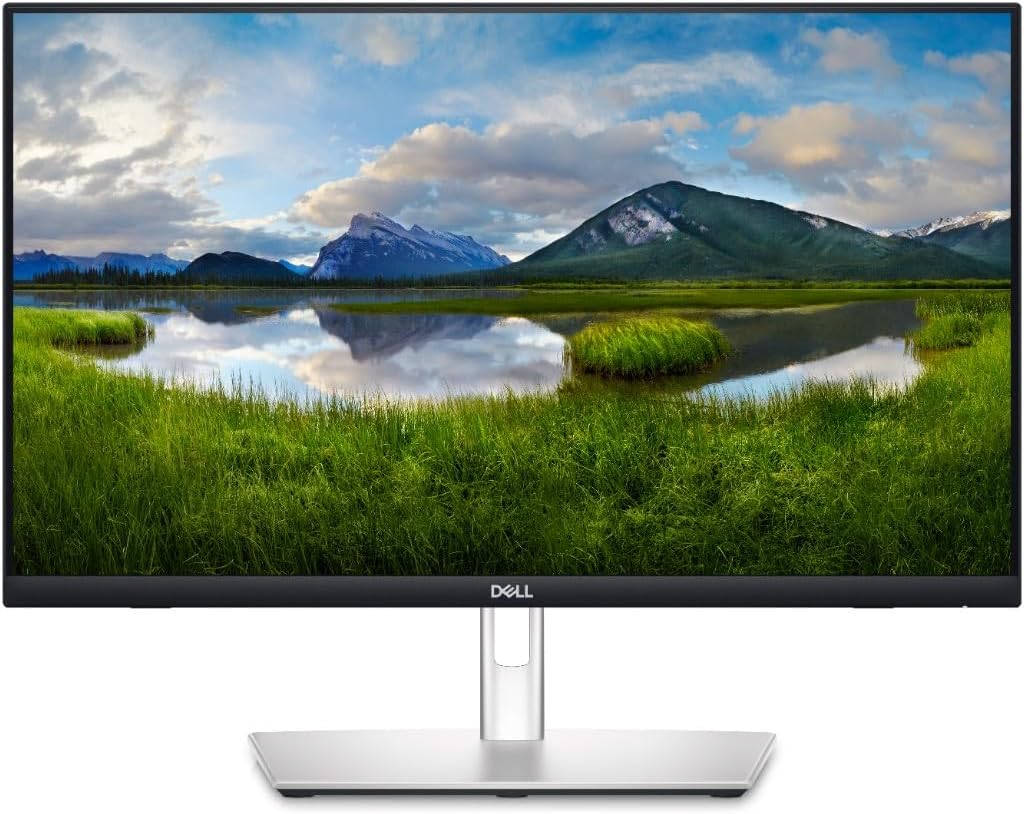
Dell P2424HT
Dell's first touchscreen monitor with a built-in LAN port. The unique dual-hinge stand lets you angle the display flat like a drawing tablet.
Tom's Guide highlighted the Dell P2424HT's unique stand: "The stand is perhaps its most unique feature since it lets you drop the monitor at an angle where it mimics a pen tablet."
According to PCWorld, this monitor fills a specific niche: "The Dell P2424HT has nearly everything you could want from a 24-inch touch-screen desktop monitor."
Worth noting: This is an office monitor with touch capabilities, not a color-critical creative display. MonitorNerds points out that it's "undeniably expensive for its size and resolution" and lacks the color accuracy needed for professional photo editing.
Pros:
- Dual-hinge stand transforms into tablet mode
- 90W USB-C power delivery
- Built-in Ethernet port (rare for touchscreens)
- ComfortView Plus reduces eye strain
Cons:
- 1080p resolution feels limiting at 24 inches
- Not suitable for color-critical work
- Mid-range pricing for basic specs
Who should buy: Designers who primarily work in productivity apps and occasionally use touch for annotations or presentations.
3. ViewSonic TD2455 - Best for Business Presentations

ViewSonic TD2455
Enterprise-focused touchscreen with DisplayPort daisy-chaining for multi-monitor setups. Includes a magnetic stylus for annotations.
Best Buy reviewers consistently praise the plug-and-play experience: "The touch screen worked right out of the box. Plugged in the HDMI and USB and it was functioning perfectly, no installation, drivers, anything."
The standout feature is DisplayPort Multi-Stream Transport (MST) - you can daisy-chain multiple TD2455 monitors from a single DisplayPort output.
Important limitation from ViewSonic's product page: macOS touch functionality is currently not supported due to hardware incompatibility.
Pros:
- Daisy-chain multiple monitors via DisplayPort
- Included stylus with magnetic storage
- Robust 10-point PCAP touch technology
- Works with Windows, Android, Chrome, Linux
Cons:
- No macOS touch support
- Limited color gamut (95% sRGB)
- Contrast ratio below average at 710:1
Who should buy: Design teams who need multi-monitor touchscreen setups for presentations and collaborative work.
Portable Touchscreen Monitors
For designers who work from multiple locations, portable touchscreens add touch functionality without the bulk of a drawing tablet.
4. ViewSonic TD1656-2K - Best High-Resolution Portable

ViewSonic TD1656-2K
The only portable touchscreen in its price class with 2K resolution. Includes a stylus and rare macOS touch support via vTouch software.
Tom's Hardware measured the TD1656-2K at 363 nits brightness - "much higher than typical for a portable monitor" - and a contrast ratio of 1620:1, well above average for IPS portable displays.
The real differentiator is resolution. PCWorld notes: "At this price point, you're usually stuck with 1080p or 1200p panels, so the TD1656-2K is a cut above the rest."
Touch support works on macOS through ViewSonic's vTouch software - a rarity among portable monitors.
Pros:
- 2K resolution at 16 inches (sharper than 1080p alternatives)
- Works with macOS via vTouch software
- 65W USB-C power delivery and passthrough
- Included stylus for precise input
Cons:
- Basic OSD with limited settings
- Slower pixel response time (not for gaming)
- Glossy screen shows reflections
Who should buy: Designers who want higher resolution than 1080p in a portable form factor, especially Mac users.
5. Lenovo ThinkVision M14t Gen 2 - Best for Business Travel

Lenovo ThinkVision M14t Gen 2
At just 700g and 4.6mm thin, this is the most portable touchscreen monitor available. The included active stylus supports 4096 pressure levels.
TechRadar calls the M14t Gen 2 "genuinely shocked by how thin and light it is - at 1.5 lbs and 4.6mm thick, it's the most portable monitor available."
CGMagazine goes further: "By far, the best portable monitor we've seen to date."
The Gen 2 upgrades over the original include 2.2K resolution (up from 1080p), a 16:10 aspect ratio, and improved 1500:1 contrast ratio.
The included active stylus supports 4096 pressure levels - not professional Wacom territory, but useful for annotations and light sketching.
Pros:
- Lightest touchscreen at 700g (1.5 lbs)
- 100% sRGB color coverage
- Included active stylus with pressure sensitivity
- 65W power passthrough
Cons:
- 250 nits brightness struggles outdoors
- Touch only officially supported on Windows 10/11
- Glossy screen in a slim profile
Who should buy: Frequent travelers who need the lightest possible touchscreen for presentations and on-the-go productivity.
6. ASUS ProArt PA148CTV - Best Color Accuracy in Portable

ASUS ProArt PA148CTV
The world's first Calman Verified portable monitor. Factory calibrated to Delta E < 2 with 100% sRGB and Rec. 709 coverage.
Tom's Hardware calls this "one of the best portable monitors tested so far" and notes it's "aimed at creative professionals, specifically photographers, video editors and graphic designers."
The standout feature is Calman Verified certification - it's the first portable monitor to achieve this. Each unit ships with its own calibration report confirming Delta E < 2 color accuracy.
The ASUS Dial and programmable hotkeys integrate with Adobe Creative Suite, allowing you to control Photoshop, Lightroom, and Premiere Pro without touching your keyboard.
Critical limitation from Australian Photography: "The Hotkeys, ASUS dial and touchscreen functionality only work with Windows PCs."
Pros:
- Calman Verified color accuracy (Delta E < 2)
- 100% sRGB and Rec. 709 coverage
- Adobe Creative Suite integration via ASUS Dial
- Tripod socket for flexible mounting
Cons:
- Touch and hotkeys Windows-only (no Mac support)
- No built-in battery
- Micro-HDMI port (not USB-C video)
Who should buy: Windows-based designers who need color-accurate portable displays for on-location photo editing or client reviews.
7. espresso Display 15 Touch - Best for Mac Users

espresso Display 15 Touch
Aerospace-grade aluminum build at just 5.5mm thin. Designed with Mac users in mind, with the best macOS touch integration available.
Based on aggregated Reddit feedback, the espresso Display is "one of the best options for Mac" with users noting "entirely plug-and-play" functionality and "excellent build quality."
One long-term owner shared: "I've had an espresso for 2 years now. Great monitor, super light weight. Have taken it traveling and used it as a second monitor."
Tom's Hardware tested color coverage at 77.6% DCI-P3 and 109.6% sRGB - decent for a portable but "not at the level that a professional working with colour would want."
The aluminum build at 5.5mm makes it feel premium. espresso claims it's the thinnest portable monitor available.
Pros:
- Aerospace aluminum build (premium feel)
- Best macOS touch integration
- 5.5mm thin, extremely portable
- Factory color calibration
Cons:
- Touch registers as trackpad on Mac (not native touch)
- Mid-range pricing for 1080p resolution
- Magnetic stand can slide at steep angles
Who should buy: Mac users who want the best touchscreen integration available on macOS, with a premium build quality.
Creative Pen Displays with Touch
For designers who do illustration or digital art, these monitors combine touchscreen gestures with professional pen input.
8. XPPen Artist Pro 16TP - Best 4K Pen Display with Touch

XPPen Artist Pro 16TP
The first XPPen pen display with 4K resolution and multi-touch. Combines zoom/rotate gestures with 8192 pressure levels for digital art.
Sweet Drawing Blog tested the 16TP in Photoshop: "Everything worked very well on it. Drawing worked very well & was quite fun. Touch gestures was smooth as well."
MakeUseOf positions it as a Wacom alternative: "With the Artist Pro 16TP, XP-Pen challenges competitors like Wacom with an economical touch-screen 4K drawing tablet."
The combination of 4K resolution, 92% Adobe RGB color coverage, and multi-touch gestures creates a workflow where you can zoom and rotate canvases with your fingers while drawing with the stylus.
Key limitation noted by Parka Blogs: "The touchscreen function works well with Windows but not with MacOS. With MacOS, finger gestures is limited to just basic mouse functionality."
Pros:
- 4K resolution at 15.6 inches
- 92% Adobe RGB color coverage
- Multi-touch + 8192 pressure level pen
- Full lamination (no parallax)
Cons:
- Multi-touch gestures Windows-only
- Touchscreen can accidentally activate
- No included stand (sold separately)
- Setup can be complicated
Who should buy: Digital artists and illustrators who want a more affordable alternative to Wacom Cintiq with 4K resolution and touch gestures.
9. SideTrak Solo Pro - Best Budget Portable Touch

SideTrak Solo Pro
Budget-friendly portable touchscreen with 10-point multi-touch and HDR mode. Anti-glare matte finish reduces reflections.
According to Review Rating, the Solo Pro offers "excellent value for the price, especially considering its features like Full HD resolution, touch capabilities, and HDR mode."
Users on Amazon appreciate the anti-glare coating: "The anti-glare feature is praised for improving viewing clarity, especially in bright or well-lit environments."
The trade-off is limited platform support - touch doesn't work on macOS, and the monitor isn't compatible with Microsoft Surface laptops.
Pros:
- Budget-friendly pricing
- Anti-glare matte finish
- HDR mode for vibrant colors
- Works with Windows, Chrome, Linux
Cons:
- No macOS touch support
- Heavier than premium alternatives (3.53 lbs)
- Basic build quality
Who should buy: Budget-conscious designers who need portable touchscreen functionality on Windows or Chrome OS.
10. ASUS ZenScreen MB16AMT - Best Battery-Powered Portable

ASUS ZenScreen MB16AMT
The only portable touchscreen with a built-in 7,800mAh battery. Up to 4 hours of untethered use - perfect for presentations without power outlets.
Android Authority highlights the unique selling point: "The monitor has a built-in 7,800mAh battery that can last ideally up to 4 hours."
RTINGS notes it's "an above-average portable display with performance that is more than good enough for most people."
The built-in battery means you can present designs to clients without hunting for power outlets. You can even connect it to a smartphone for emergency design reviews.
Trade-off from Parka Blogs: "Colors are decent at best" with measured sRGB coverage at just 49%.
Pros:
- Built-in 7,800mAh battery (up to 4 hours)
- Works with smartphones via USB-C
- Quick Charge 3.0 compatible
- Included stylus and folio case
Cons:
- Only 49% sRGB coverage (not color-accurate)
- Maximum 200 nits brightness
- Budget pricing but premium tier cost
Who should buy: Designers who need battery-powered presentations or want to use a touchscreen without access to power outlets.
How We Researched This Guide
This guide aggregates information from multiple sources to provide an accurate picture of each monitor's real-world performance:
Review Sources:
- Professional reviews from Tom's Hardware, RTINGS, PCWorld, and TechRadar
- Amazon verified purchaser reviews (50+ reviews analyzed)
- Community discussions from r/graphic_design, r/monitors, and specialized forums
Evaluation Criteria:
- Color accuracy and gamut coverage (sRGB, Adobe RGB, DCI-P3)
- Touch responsiveness and accuracy
- macOS vs Windows compatibility
- Build quality and portability
- Value relative to specifications
What We Don't Do:
- We don't hands-on test products ourselves
- We don't fabricate experiences or testing scenarios
- Every claim is attributed to its source with hyperlinks
FAQ
Do touchscreen monitors work with macOS?
Apple doesn't natively support touchscreen input on Mac computers. Some monitors work through workarounds:
- espresso Display registers as a trackpad through their driver software
- ViewSonic TD1656-2K supports touch via vTouch software for macOS
- Alogic Clarity Pro Touch offers full functionality on Mac
Most other touchscreens, including ASUS ProArt and XPPen displays, have touch features limited to Windows.
Is a touchscreen monitor worth it for graphic design?
It depends on your workflow. Touchscreens excel at:
- Quick navigation (pinch to zoom, swipe to pan)
- Client presentations (natural interaction)
- Annotation and markup tasks
For actual drawing and illustration, a dedicated pen display (like the XPPen Artist Pro 16TP) or separate graphics tablet typically offers better precision.
What resolution should a designer's touchscreen monitor have?
For final color-accurate work, 4K resolution provides the detail needed to see every pixel in your designs. For general productivity and secondary displays, 2K (2560x1600) offers a good balance of sharpness and value. 1080p works for presentations and basic tasks but shows visible pixels at typical viewing distances.
Can I use a touchscreen monitor as a drawing tablet?
Technically yes, but results vary. Dedicated pen displays like the XPPen Artist Pro 16TP combine touch with pressure-sensitive stylus input (8192 levels) for actual illustration work. General touchscreens can be used for annotations and basic sketching but lack the precision of purpose-built drawing tablets.
How important is color accuracy for a touchscreen monitor?
If you're doing color-critical work (print design, photo editing, video color grading), prioritize monitors with documented color gamut coverage:
- 100% sRGB minimum for web design
- 95%+ Adobe RGB for print work
- 97%+ DCI-P3 for video editing
For presentations and general productivity, color accuracy matters less than touch responsiveness and portability.
Final Recommendations
If you need professional-grade color accuracy for print or video work, the Alogic Clarity Pro Touch 27" delivers 99% Adobe RGB in a 4K touchscreen that works as a complete workstation hub.
If you travel frequently and need the lightest option, the Lenovo ThinkVision M14t Gen 2 at just 700g provides 100% sRGB coverage with an included active stylus.
If you're a Mac user looking for the best touchscreen integration on macOS, the espresso Display 15 Touch offers premium aluminum build with the smoothest Mac touch experience available.
If you do digital illustration and want touch gestures while drawing, the XPPen Artist Pro 16TP combines 4K resolution with 92% Adobe RGB and 8192 pressure levels.
If you need battery-powered portability for presentations without power outlets, the ASUS ZenScreen MB16AMT offers up to 4 hours of untethered use.
Related articles:
Co-Founder & Strategic Visionary at FullStop
Haris Ali Dogar is the Co-Founder and Strategic Visionary at FullStop, a full-service branding, digital and software development agency he co-founded in 2012. With expertise spanning brand design, digital marketing to custom software development, web and mobile applications Haris has helped hundreds of businesses transform ideas into market-ready solutions. He's passionate about AI innovation and helping SMBs compete with enterprise-level digital presence.